 Use Rekwest For Free
The essentials for a good party:
Everything in the Free plan plus:
* Price may vary slightly based on location, currency, and platform.

Everything in the Professional plan plus:
* Price may vary slightly based on location, currency, and platform.
Create a business profile that showcases your services and experience. Get new bookings by providing your contact information, socials, and a call to action.

Automatically export song requests to a Tidal, SoundCloud or Apple Music playlist in realtime. Stream this playlist from Serato DJ, Rekordbox, Djay, VirtualDJ, Traktor, and many other DJ software platforms. No more manual copying to your DJ software.

Get access to lots of different QR code poster designs and use the one that matches your event theme. Rekwest PRO also gives you access to a universal QR code that can be reused across all of your events.


Restrict song requests by choosing a playlist as your repertoire. Guests will only be able to request songs from this playlist.

Set the schedule once and your weekly or monthly event repeats automatically. The same link and QR code keep working for every occurrence, so there is no need to create a new event every time.

Find out what keeps your guests entertained using detailed measurements and analytics.

Prepopulate the list of song requests using a Spotify, SoundCloud, or Apple Music playlist.

Allow your guests to add personal messages to their song requests. Perfect for shoutouts, dedications, and special occasions.


Turn certain guests into VIPs to have their requests prioritized automatically. Requests from VIPs are always shown on top of the request list. Perfect for special moments and high-priority guests, such as birthdays, anniversaries, or anyone who deserves extra attention.

Stop new requests for 15 minutes, an hour or as long as you need. A short note tells your guests why.

Take full control over the look and feel of your events. Customize all colors, accents, and backgrounds to match your brand identity or a specific event's style. Create unlimited reusable themes and apply them to any event with a single tap.

Put your request list on any TV or projector. New requests and votes come in with smooth animations. A QR code on screen lets everyone join in. The layout is fully customizable and works in landscape and portrait.


See the tempo and key of every song request, plus the keys that mix well with it. Plan your next track without opening another app.

Upload your own logo and have it appear everywhere: on the loading screen guests see after scanning your QR code, in the corner of the requests list, and throughout the guest experience. Rekwest will look like your own branded application.

Tweak parts of the guest-facing interface to better fit your event. Hide the "Download App" button, collapse the cover image on small devices, or show your custom logo in the corner of the requests list for a fully branded feel.

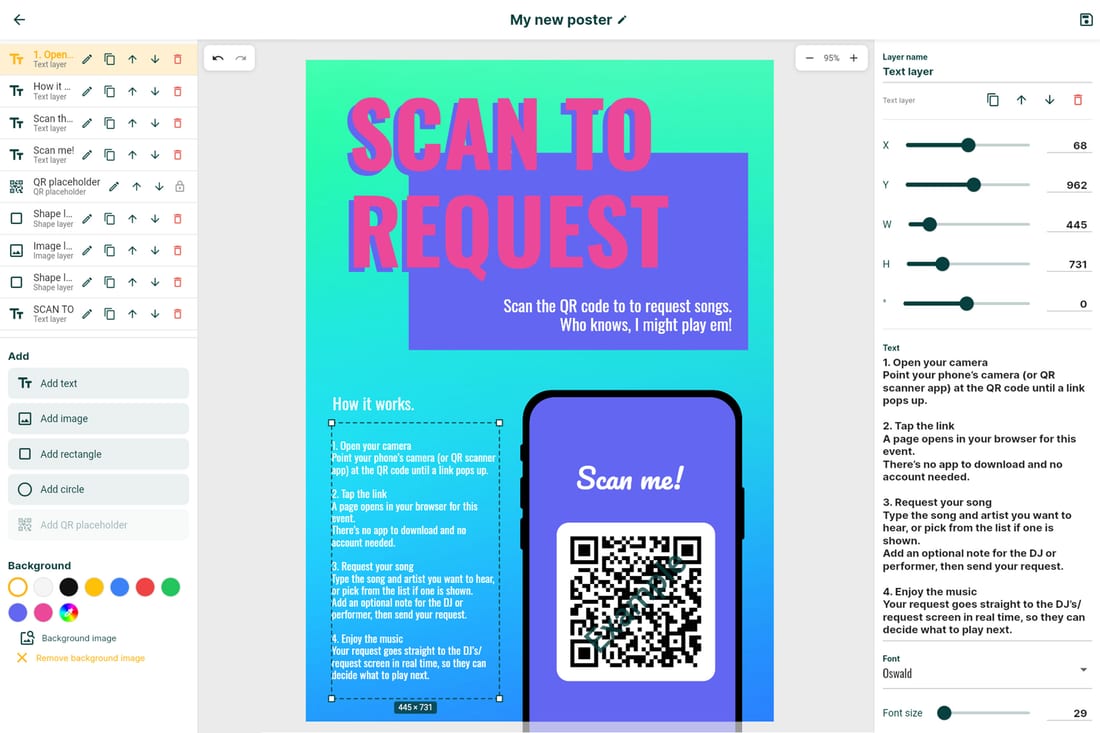
Create stunning QR code posters that perfectly fit your brand. Place your own images, text, shapes, and colors anywhere on the canvas, position the QR code wherever you like, and export the finished poster as a high-resolution PDF, ready to print and hand out at your event.
With kiosk mode you can easily set up a dedicated device at your event for guests to request songs from. Kiosk mode has various built-in features to prevent guests from leaving the event or deleting requests.

Send automatic marketing emails to event attendees a couple of hours after an event has ended to attract new customers. Emails are fully customizable to include whatever information you want to share.

Lock guests to your event so they can't navigate away and explore other parts of Rekwest. Back buttons and other navigation paths that lead away from your event are hidden, keeping the focus entirely on your show.

Send guests directly to the request creation page after they join your event, skipping the song requests list. Removes friction and gets guests submitting songs immediately.

Build a repertoire of your own instead of pointing at a single playlist. Combine several Spotify, SoundCloud, Apple Music, or TIDAL playlists and add songs by hand; duplicates are skipped automatically. Guests can search and filter it however big it gets, and you can reuse it across every event.

Switch between comfortable, compact and dense request cards, so you can fit many more requests on screen. Set the style per status column.
Show guests a custom popup when they join your event for the first time and after they submit their first request. Share house rules, set expectations, or just say thanks.
Free to start. Your first event is live in under a minute.
Or use Rekwest in your browser


