AI Stem Separation for Mobile DJs: A Practical 2026 Guide

Two years ago, pulling a clean vocal out of a track meant hunting for an acapella online and hoping the key matched. In 2026, your software does it live, right on the deck, while the crowd is dancing. AI stem separation has quietly become the most useful tool in the mobile DJ kit, letting you split any song into vocals, drums, bass, and melody on the fly. If you play weddings, parties, and corporate gigs, this is the upgrade that makes your transitions smoother, your mashups bolder, and your requests easier to handle. Here is how to actually use it.
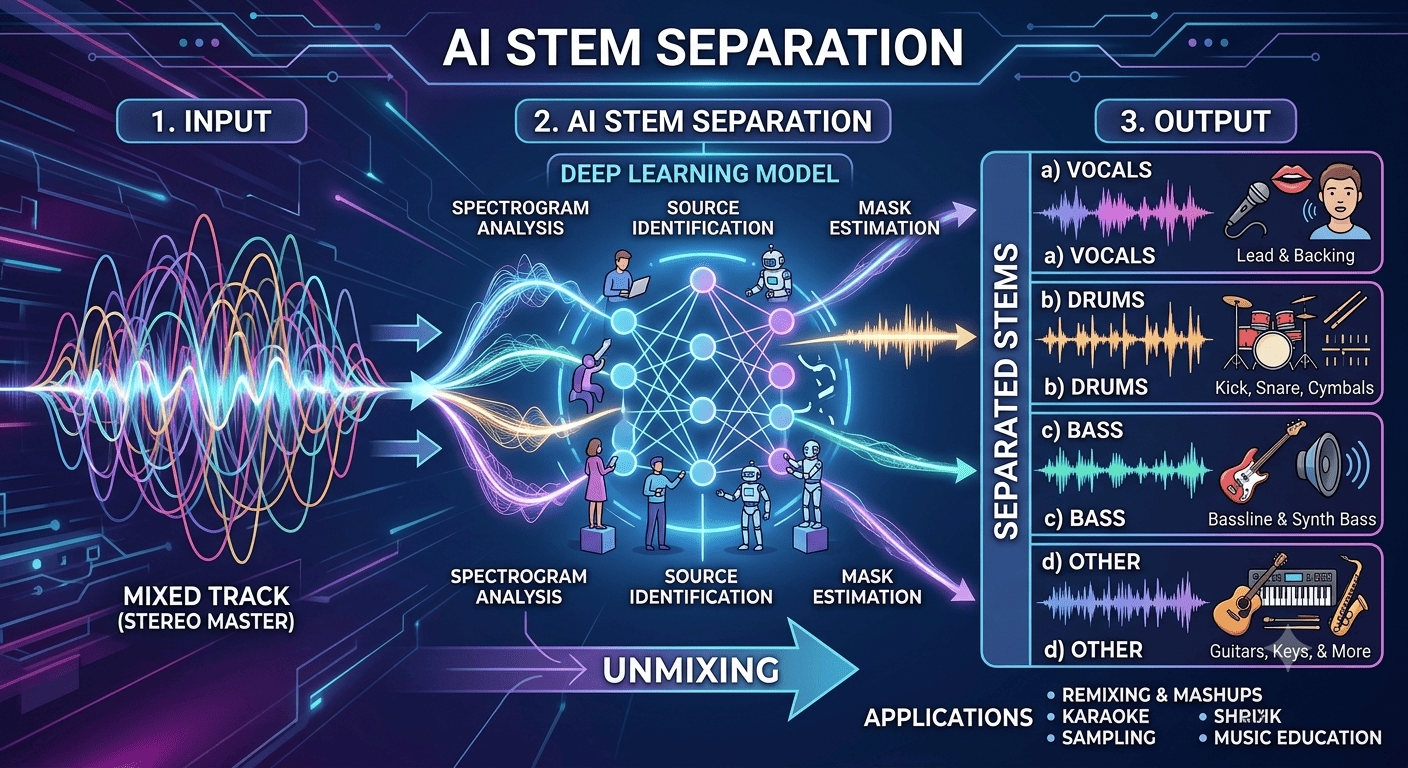
What Stem Separation Really Does
Stem separation uses AI to break a finished song into its parts in real time. Instead of one locked stereo file, you get independent control over the vocal, the drums, the bass, and the melodic layer. That means you can drop the vocal from one track over the beat of another, kill a muddy bassline during a blend, or isolate a hook for a quick sing along moment. It happens in milliseconds, with no pre processing and no separate files to manage.
The big platforms all support it now. Serato Stems gives you four faders for tactile control, rekordbox has native Track Separation that maps to dedicated stem buttons on AlphaTheta and Pioneer DJ hardware, and VirtualDJ offers real time stems across hundreds of controllers. For mobile setups, Algoriddim djay Pro and its Neural Mix engine run this on an iPad or even an iPhone with surprisingly clean results. Standalone tools like Moises let you prep stems ahead of time when you want the highest possible quality.
Why It Matters for Mobile DJs
Mobile DJs live and die by reading the room and pivoting fast. Stems give you room to maneuver that you simply did not have before. A wedding crowd wants a familiar vocal, but the original tempo drags on the dance floor, so you lay that vocal over a punchier beat. A corporate audience needs the energy up without the explicit lyrics, so you pull the vocal down at the right moment. A party spans four generations, so you bridge a throwback and a current hit by matching their instrumentals underneath a single vocal line.
The result is a set that feels custom built rather than a playlist on shuffle. You stop relying on hard cuts and start weaving songs together in ways that feel intentional, which is exactly what gets you booked again.
Practical Ways to Use Stems at a Gig
Cleaner Transitions
The most reliable win is smoother blends. As you mix out of a track, mute its bass so two low ends never fight and turn the whole dance floor to mud. As you bring the next song in, lead with its drums and melody, then let the vocal land once the beats are locked. Your transitions instantly sound more professional with almost no extra effort.
Instant Mashups
Grab the acapella from a song everyone knows and float it over the instrumental of another. A classic vocal on a modern beat, or a current hook on a nostalgic groove, creates a moment that feels like it only exists in your room tonight. Keep the two tracks close in key and tempo and the payoff is huge.
Handling Awkward Requests
Sometimes a guest requests a song you love musically but cannot play with its original lyrics at a family event. Stems let you drop the vocal and keep the groove, so you honor the request without clearing the floor. You can also rescue a track with a weak intro by starting on its drums alone and building from there.
Where Song Requests and Stems Meet
Stems get even more powerful when you know what the crowd actually wants next. When requests come in through a tool like Rekwest, guests scan a QR code or open a link in their browser, with no app download and no account, then send you tracks that you approve before anything plays. You get a live feed of the songs the room is craving, which is the perfect raw material for a spontaneous stem blend or a well timed acapella drop.
Because approved requests export straight into Serato DJ, rekordbox, djay, VirtualDJ, or Traktor, the requested track is already loaded and ready for you to work its stems. You keep full control of your set, the crowd feels heard, and you get to show off a seamless mashup of the exact song someone just asked for. That combination of crowd input and live stem control is one of the most engaging things you can do behind the decks in 2026.
Getting Started Without Overwhelm
You do not need to overhaul your whole rig. If your current software already includes stems, spend one practice session doing nothing but muting and unmuting the four parts until it feels natural. Learn where the controls live on your controller so you are not staring at a screen mid set. Start with the simple bass swap on transitions, then graduate to full acapella mashups once your hands know the moves.
Quality still varies between engines and songs, so test your go to tracks at home first. Dense, busy productions and older recordings can leave a little bleed, while clean modern pop separates beautifully. Knowing which songs hold up under isolation means you never gamble on the dance floor.
AI stem separation has turned every finished song into raw material you can reshape live, and mobile DJs who lean into it are delivering sets that feel truly one of a kind. Pair that creative freedom with a steady stream of crowd requests from a tool like Rekwest, and you have a workflow that keeps the floor packed while making every night feel personal. Start small, practice the basics, and let the room hand you your next great mashup.